Attention – High Addiction Potential!
Tamoggemon Software has just released BallZ 1.0! BallZ is an implementation of Microsoft’s evergreen JezzBall concept for Palm OS 5 handhelds and smartphones.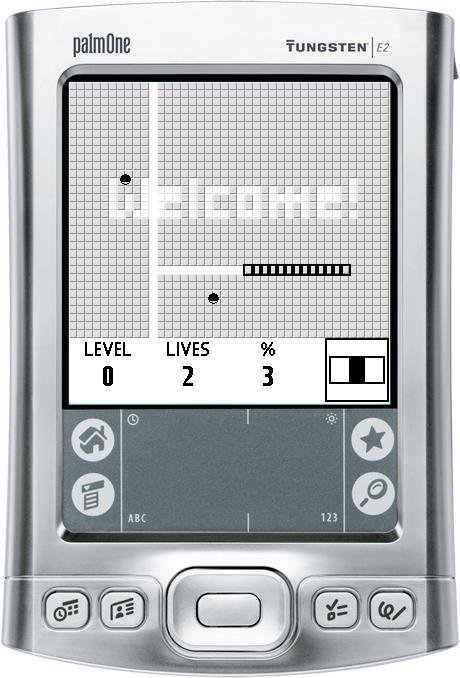
For decades, JezzBall has been popular due to its non-violent yet challenging, action-loaded game play. Tamoggemon Software has managed to adjust the JezzBall concept to mobile devices while keeping the original feel intact.
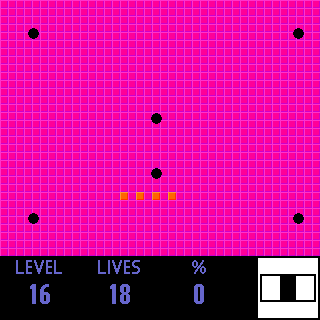
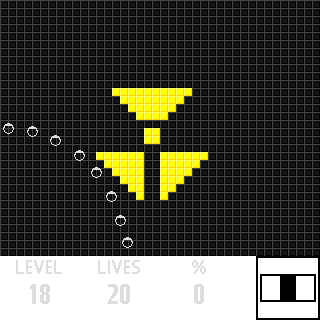
The registered version of BallZ contains 30 colourful and unique levels. The speed of the game can be adjusted to the player’s skills in 5 steps; moody background music and sound effects create an immersive game play experience rarely seen on a mobile device.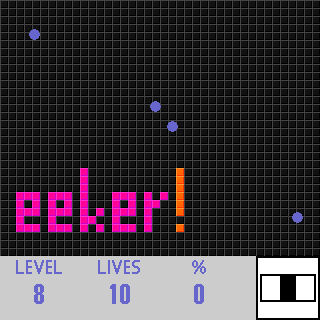
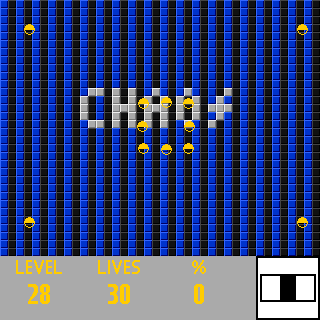
BallZ is compatible with all Palm OS 5 handhelds that have a colour screen (including Treo 600). The program costs $14.95 and can be purchased at MobiHand's. A free 14 day trial is available from tamoggemon.com
Bringing the JezzBall feeling to Palm OS - BallZ 1.0 Released
Palm cancels the Foleo
From CNET News.com:
Faced with biting criticism of the Foleo, a Linux-based psuedo-laptop gadget, Palm has decided to cancel the first generation of the device.
Palm CEO Ed Colligan broke the news on Palm's official blog Tuesday after the close of the stock market. Just last week, a financial analyst predicted that Palm would have to delay the Foleo's launch until September or October because of serious software-related bugs, but Colligan decided to kill the entire project instead.
Palm unveiled the Foleo at the D: All Things Digital conference in May to widespread skepticism, despite the fact that Palm founder Jeff Hawkins considered it "the best idea I've ever had." The Foleo is basically an underpowered laptop that's designed to give Treo users a break from typing e-mails on a small phone keyboard. However, few could figure out why smart phone users--who ostensibly own a laptop already--would want to buy a separate $499 device that could do little more than send e-mails. [Read more]
2 TXs bricked in less than 10 days!
That's right, over the past 10 days I've replaced 2 Palm TXs. And boy I'm pissed.
The first TX handheld, which I've owned for over a year, was bricked after I attempted to copy PicselBrowser from my RAM from the expansion card, via ZLauncher, and it didn't show up in the launcher view. I was going to attempt to find it with PalmInsider Pro, but on lauching, my device went into a reset. One problem, on resetting, it would get stuck at the grey Palm logo part. Hard reset, soft reset, cold reset, warm reset, and even a zero-out reset did nothing. I let the battery die and recharged it, with no luck. I ended up getting it replaced.
Then, just yesterday, I was doing a wifi network hotsync and the connection was lost and when I went to look at new TX, it was in a reset loop. This time, the reset would stay on the grey screen for a few sec, then go blank and reset. Once again, none of the resets did a thing and letting the power die did nothing.
If anyone has any ideas on why it's been happening, and/or how to prevent future problems, email me at jason@canuck-pda.ca.
Canuck Software releases DIAMemory
The utility that gives you DIA an added boost in usability
Springing forth from their return, Canuck Software today announced the immediate availability and release of DIAMemory. This new shareware application improves upon the DIA system and remembers how you like you DIA set up with each program.
There's no special methods or tedious per-application settings you need to go through, all you need to do is enable it and the rest is automated. Whenever you leave an application, DIAMemory will remember the DIA status (up/down) and the screen orientation. Then, when you return to that application, those settings will be retrieved and applied.
With DIAMemory, management of DIA is greatly improved. For example you can go from a launcher, set in portrait mode with DIA up, straight to a web browser, in landscape mod with DIA down, without having to touch the DIA at all.
DIAMemory is shareware with a 7-day trial and registration costs a mere $3.95. It is available exclusively at http://www.canuck-software.ca
Palm Desktop 6.2 Beta for Windows Vista
 Palm recently released its Palm Desktop 6.2 Beta for Windows software.
What's New:
- Windows Vista compatible: Has earned Microsoft's "Works with Windows Vista" designation.
- New version: This beta software includes the new Palm Desktop 6.2 and Hotsync Manager 7 software.
- Install Tool: The Install Tool allows you to sync .prc and .pdb files (PalmOS applications and databases) to your device.
- Outlook 2007 synchronization: Allows you to use your USB sync cable to synchronize with Outlook 2007's Calendar, Contacts, Tasks and Notes.
Canuck Software is back!
Canadian developer returns to the Palm scene, and with a new program
Unfortunately the freeware policy will need to change as the solo developer, Jason Robitaille, is now in university and now has more priorities to manage. All currently existing freeware applications will remain as such, even with their future updates, however most of the upcoming applications will now be shareware at very reasonable prices. While there will be upcoming freeware releases, shareware programs will now play a much larger role.
Along with Canuck Software's return comes and update to the popular journaling program for the PalmOS, Life As I See It, to correct several bugs and includes major internal updates.
Most importantly, Canuck Software is proud to announce the release of Life On My PC, the much-requested, shareware PC companion to Life As I See It. With Life On My PC, you can view and edit your journal entries from your PC desktop*! It even has linked password protection, meaning the same password you use in the Palm application is the one you get to use with this desktop program. Life On My PC is available for the low price of only $6.95, which includes all future updates.
*Life On My PC requires Microsoft .NET Framework and Palm Desktop with Hotsync ability
Life As I See It update is available at http://canuck-software.ca/life.html
Life On My PC is available at http://canuck-software.ca/lifepc.html
Jack BBQ summer update!

(aka Jack BBQ) version v1.6
INDUSTRY ENTERTAINMENT production
http://www.indus3.org/
The good old Jack BBQ, comes again, better then ever. The game you’ll love,comes to you fresh, chilled, just perfect for the summer time. For allkind ofshades, mobiles and easy going moments of leisure. Summer time is time forJack BBQ!
New version v1.6 of "Jack or 100 Ways to Barbecue" brings:
- Support for Windows Mobile 6
- DirectX and GAPI support for Windows Mobile
- Better buttons support for Windows Mobile
- Improved installation for Windows Mobile
- Checking for game updates
ABOUT
"Jack or 100 Ways to Barbecue" is a platform game that brings the fun of jump& run and a lot of brain exercise while solving delicate logical problems.Your aim is to find the exit out of each level, which is well hidden by doorsand guarded by unfriendly monsters whose only desire is to meet you and breakyour bones well for disturbing their domestic living area.
SUPPORTED PLATFORMS
- PalmOS
- Windows Mobile [Professional / Classic / Standard / PocketPC / Smartphone]
- Symbian S60
TRIAL VERSION
Trial version of Jack BBQ game is available for downloading athttp://www.indus3.org/. It provides a chance to play the first level of thegame. No hi-score is available in the trial version.In order to be able to play all the levels of the game, have hi-score andenable other game features you should purchase the game athttp://www.indus3.org/.
Subscribe To


 Posts
All Comments